Air Mass Modelled
Overview
Air Mass Modelling allows the ECU to generate a custom Air Mass Modelled (g/cyl) runtime by blending two independent air mass calculations together. The “Blend Table” determines the blend ratio between both parameters.
The resulting Air Mass Modelled runtime can be used throughout the ECU, including as the primary air mass source for the Fuel Mass Calculation and Engine Torque Model.
This provides a flexible method of constructing advanced air mass calculation strategies that are not possible using the predefined Air Mass Models alone.
The configuration takes place in:
Config -> Air Mass -> Air Mass Modelled Setup. See Air Mass Modelled Setup
The Air Mass Modelled Blend Table is configured from: Tuning → Fuel → Air Mass Model Blend Table
Air Mass Modeling allows the ECU to blend different methods of air mass calculation to generate the Air Mass Modeled runtime
Air Mass Modelled Setup
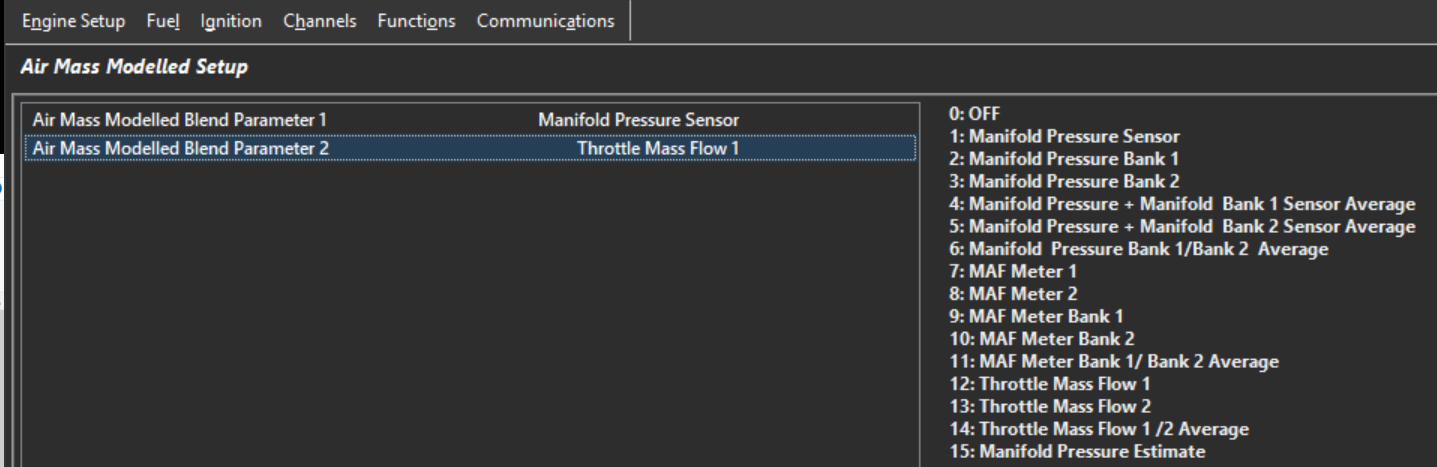
The Air Mass Modelled Setup determines the two air mass calculations used to generate the final Air Mass Modelled runtime.
Two independent inputs are available:
- Air Mass Modelled Blend Parameter 1
- Air Mass Modelled Blend Parameter 2
Air Mass Modelled Blend Parameters have the following options. Select the two air mass calculations that will be blended together to generate the final Air Mass Modelled runtime:
| Value | Blend Parameter |
|---|---|
| 0 | Off |
| 1 | Manifold Pressure Sensor |
| 2 | Manifold Pressure Bank 1 |
| 3 | Manifold Pressure Bank 2 |
| 4 | Manifold Pressure + Bank 1 Sensor Average |
| 5 | Manifold Pressure + Bank 2 Sensor Average |
| 6 | Manifold Pressure Bank 1 / Bank 2 Average |
| 7 | MAF Meter 1 |
| 8 | MAF Meter 2 |
| 9 | MAF Meter Bank 1 |
| 10 | MAF Meter Bank 2 |
| 11 | MAF Meter Bank 1 / Bank 2 Average |
| 12 | Throttle Mass Flow 1 |
| 13 | Throttle Mass Flow 2 |
| 14 | Throttle Mass Flow 1 / 2 Average |
| 15 | Manifold Pressure Estimate |
Air Mass Modelled Blend Parameter 1
Select the method of air mass calculation for Parameter 1
Air Mass Modelled Blend Parameter 2
Select the method of air mass calculation for Parameter 2
A common application is blending between Manifold Pressure Sensor and Manifold Pressure Estimate (see further help on MAP Estimate).
If blending is not required, configure both parameters to use the same air mass source or configure the blend table to fully favour the desired calculation method.
Air Mass Modelled Blend Table
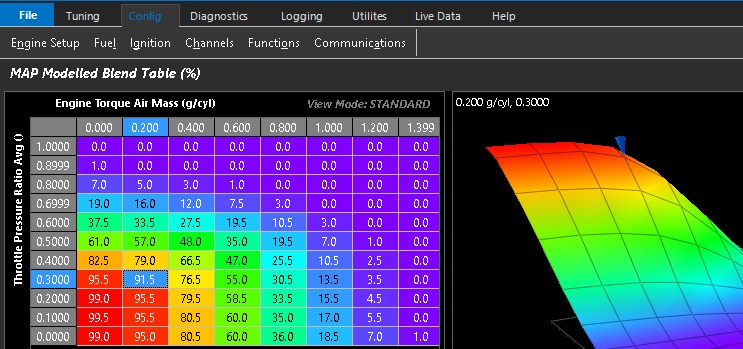
The example below shows Speed Density configured as Parameter 1 and Throttle Mass Flow (TMF) configured as Parameter 2.
The Air Mass Modelled Blend Table is a three-dimensional table with configurable axes that determines the blend ratio between the two selected Air Mass Modelled parameters.
- 0.0% = All Parameter 1
- 100.0% = All Parameter 2