Air Mass User 1
Overview
Air Mass User 1 allows the user to create a custom air mass calculation by combining two independent air mass sources. The resulting Air Mass User 1 runtime can then be used throughout the ECU wherever an air mass value is required. A Blend Table is used to determine the contribution of each source to the final air mass value.
This provides a flexible method of constructing advanced air mass calculation strategies that are not possible using the predefined Air Mass Models alone.
The configuration takes place in:
Config -> Air Mass -> Air Mass User 1 Setup. See Air Mass Model Setup
The Blend Table is configured from: Tuning → Air Mass → Air Mass User 1 Blend Table
Air Mass User 1 Setup
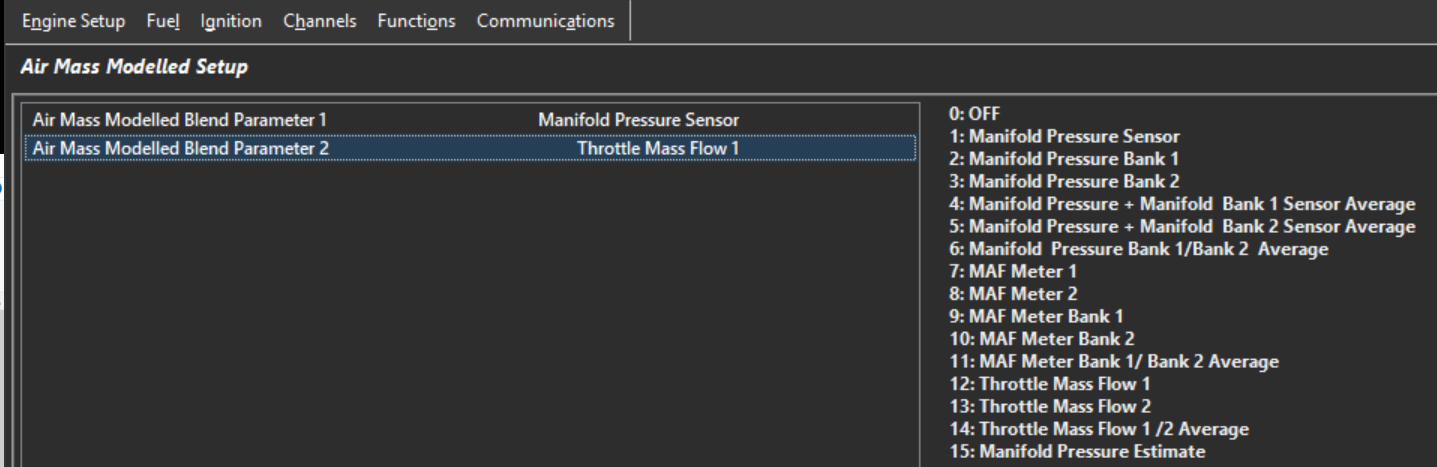
The Air Mass User 1 Setup configures the two air mass calculations used to generate the final Air Mass User 1 runtime.
Two independent inputs are available:
- Air Mass User 1 Blend Parameter 1
- Air Mass User 1 Blend Parameter 2
Air Mass User 1 Blend Parameters have the following options. Select the two air mass calculations that will be blended together to generate the final Air Mass User 1 runtime:
| Value | Blend Parameter |
|---|---|
| 0 | Off |
| 1 | Manifold Pressure Sensor |
| 2 | Manifold Pressure Bank 1 |
| 3 | Manifold Pressure Bank 2 |
| 4 | Manifold Pressure + Bank 1 Sensor Average |
| 5 | Manifold Pressure + Bank 2 Sensor Average |
| 6 | Manifold Pressure Bank 1 / Bank 2 Average |
| 7 | MAF Meter 1 |
| 8 | MAF Meter 2 |
| 9 | MAF Meter Bank 1 |
| 10 | MAF Meter Bank 2 |
| 11 | MAF Meter Bank 1 / Bank 2 Average |
| 12 | Throttle Mass Flow 1 |
| 13 | Throttle Mass Flow 2 |
| 14 | Throttle Mass Flow 1 / 2 Average |
| 15 | Manifold Pressure Estimate |
Air Mass User 1 Blend Parameter 1
Select the method of air mass calculation for Parameter 1
Air Mass User 1 Blend Parameter 2
Select the method of air mass calculation for Parameter 2
A common application is blending between Manifold Pressure Sensor and Manifold Pressure Estimate (see further help on MAP Estimate).
If blending is not required, configure both parameters to use the same air mass source or configure the blend table to fully favour the desired calculation method.
Air Mass User 1 Blend Table
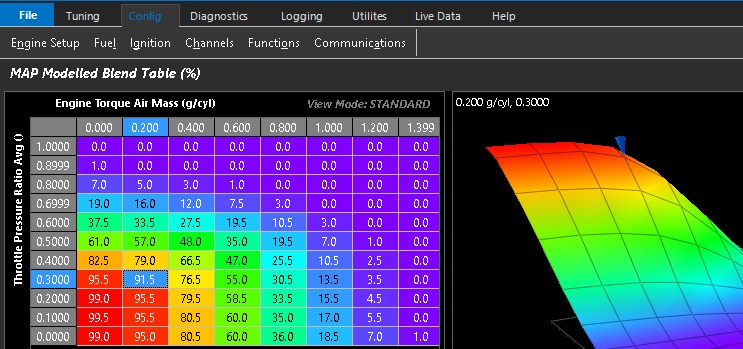
The example above shows Speed Density configured as Parameter 1 and Throttle Mass Flow (TMF) configured as Parameter 2.
The Air Mass User 1 Blend Table is a three-dimensional table with configurable axes that determines the blend ratio between the two selected Air Mass User 1 parameters.
- 0.0% = All Parameter 1
- 100.0% = All Parameter 2