Speed Density (MAP)
Overview
The ECU’s primary Air Mass Model is Speed Density (MAP Sensor).. The basis of this calculation is derived using the Ideal Gas Law; PV = nRT
The ECU calculates the injection time for speed density using the following information:
- Displacement volume per cylinder (cc).
- Intake Manifold Air Pressure - MAP(kPa)
- Lambda Target (La)
- Stoichiometric Ratio of the Fuel (Stoich)
- Injector Flow rate (cc/min)
- Charge Temperature (DegC)
- Fuel Density (g/ml)
- Fuel Pressure (kPa)
- Engine VE (%)
- Gas Constant -
R= 287J/Kg/K for Dry Air.
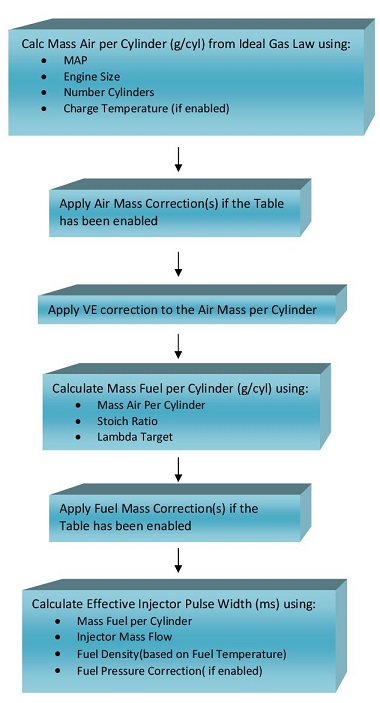
Using these inputs, the ECU calculates the mass of air trapped within each cylinder for every engine cycle. The calculated air mass is then used to determine the required fuel mass to achieve the commanded Lambda Target, before being converted into an injector pulse width.
Important Note
- Since the air mass is calculated rather than measured directly, the accuracy of the Speed Density model depends heavily on correct calibration of the Volumetric Efficiency (VE) table(s).
See here for more information: VE Tables
In the predefined Speed Density (MAP) Air Mass Model, the pressure source is fixed to the Manifold Pressure input channel and cannot be changed.
If an alternative pressure source is required, this is only available when using the Emtron Air Mass Model (Mode 5):
- Set Air Mass Model = Emtron Air Mass Model
- Configure Calculation 1 or Calculation 2 as Speed Density
- Configure the desired pressure source from:
Config → Air Mass → Speed Density Setup → Speed Density MAP Source
Speed Density Setup
The Speed Density setup parameters are configured from: Config → Air MAss → Speed Density (SD) Setup
The following settings are used to configure the Speed Density Air Mass Model.
VE Table Control
Selects the method used to generate the final Volumetric Efficiency (VE) value used by the Speed Density calculation (Non-Banked Mode).
This setting is only available when the selected Air Mass Model uses Speed Density.
| Value | Mode |
|---|---|
| 0 | Not Available |
| 1 | Table 1 |
| 2 | Table 2 |
| 3 | Not Available |
| 4 | Cal Slot |
| 5 | Not Available |
| 6 | Z-Axis |
| 7 | VE Blend (VE Table 1 / VE Table 2) |
Table 1: Uses VE Table 1 exclusively for all engine operating conditions.
Table 2: Uses VE Table 2 exclusively for all engine operating conditions.
Cal Slot: Allows the active VE table to be switched dynamically in real time using the Calibration (Cal) Slot Table function. See : Tuning → Cal Control
Z-Axis: Enables a user configurable third operating axis to blend or switch between VE Table 1 and VE Table 2. The Z-axis can use any available ECU runtime making it suitable for applications such as:
- Variable camshaft systems (VTEC/VVL)
- Alternate fuel calibrations
VE Blend: Uses the VE Blend Table to generate the final VE value by blending between VE Table 1 and VE Table 2.
- 0.0% = All VE Table 1
- 50.0% = Equal blend of VE Table 1 and VE Table 2
- 100.0% = All VE Table 2
Speed Density Charge Temperature Enable
When enabled, the ECU includes Charge Temperature in the Speed Density air mass calculation. The ECU automatically corrects the calculated air mass based on Charge Temperature Estimate using the Ideal Gas Law. For this reason, the Charge Temperature Compensation Tables should initially be configured to zero (not used).
When disabled, the Speed Density model assumes a fixed charge temperature of 20°C and the Charge Temperature Compensation Tables are therefore required to provide the necessary fuel compensation.
Recommended Setting: ON
VE Expansion Ratio
The VE Expansion Ratio feature uses the relationship between:
- Exhaust Manifold Pressure (EMAP)
- Manifold Absolute Pressure (MAP)
- Engine Static Compression Ratio
to correct the effective volumetric efficiency of the engine as exhaust backpressure changes.
NOTE: VE Expansion Ratio correction operates only when the Air Mass Model is configured for Speed Density mode as this is a VE correction.
This is particularly beneficial on turbocharged engines operating at high boost pressures where increasing exhaust backpressure can significantly influence cylinder filling efficiency.
Exhaust manifold pressure can be sourced from:
| Value | Source |
|---|---|
| 0 | Off |
| 1 | EMAP Sensor 1 |
| 2 | EMAP Estimation Table |
| 3 | EMAP Sensor 1 / 2 Average |
- EMAP Sensor 1 uses the measured Exhaust Manifold Pressure 1 input.
- EMAP Estimation Table generates an estimated exhaust pressure using the configured Exhaust Pressure Estimated (EMAP) Table.
- EMAP Sensor 1 / 2 Average uses the average of Exhaust Manifold Pressure Bank 1 and Bank 2 sensors.
Exahust Pressure Estimated Enable: Config view -> Calculated -> Exhaust Pressure Estimation Setup.
Exahust Pressure Estimated Table: Tuning view -> Air Mass -> Exhaust Pressure Estimation Table.
Speed Density MAP Source
Selects the pressure source used by the Speed Density calculation. This setting is ONLY available when the selected Air Mass Model is Emtron Air Mass Model.
For all predefined Air Mass Models this setting defaults to the Manifold Pressure input and cannot be modified.
The following pressure sources are available:
| Value | Pressure Source |
|---|---|
| 0 | Off |
| 1 | Barometric Pressure |
| 2 | Manifold Pressure |
| 3 | Manifold Pressure - Bank 1 |
| 4 | Manifold Pressure - Bank 2 |
| 5 | Manifold Pressure - Bank 1 / 2 Average |
| 6 | Boost Pressure |
| 7 | Boost Pressure - Bank 1 |
| 8 | Boost Pressure - Bank 2 |
| 9 | Boost Pressure - Bank 1 / 2 Average |
| 10 | MAP Estimate |
| 11 | User Pressure 1 |
| 12 | User Pressure 2 |
| 13 | User Pressure 3 |
| 14 | User Pressure 4 |
Speed Density MAP Bank 1 and Bank 2 Source.
Selects the pressure source used for each individual bank Speed Density calculation.
This setting is only available when:
- The selected Air Mass Model is Emtron Air Mass Model
- Air Mass Bank Control is enabled
The same pressure source options described in Speed Density MAP Source are available for both Bank 1 and Bank 2 calculations.
Example:
- MAP = 252kPa
- Charge Temperature = 30.7 DegC
- Volume Per Cylinder = 666.6
- Stoich Ratio = 9.9
- Lambda Target = 0.785
- Engine VE = 96.6 %
Fuel Mass (g) = 0.2395
In this basic example, if the cylinder achieves 96.6% volumetric efficiency, then 0.2395 grams of fuel is required to achieve a Lambda Target of 0.785.
The VE Table(s) define the volumetric efficiency of the engine at varying engine speeds and loads and represent the True VE of the engine. A typical table is shown in Figure 1 for a turbo charged engine.
Fuel VE Table
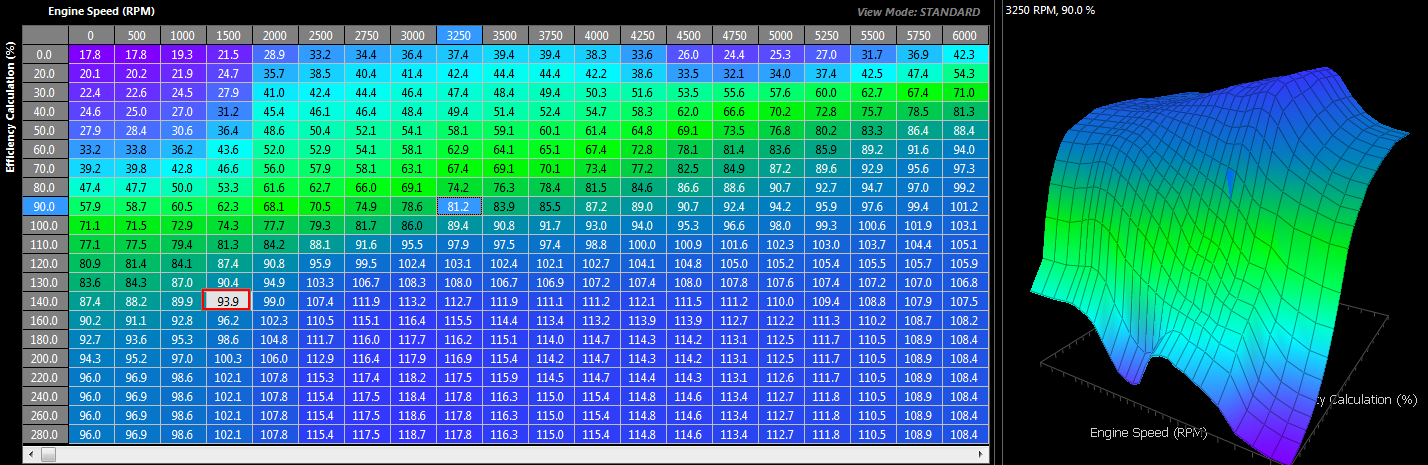 Figure 1
Also, the Stoichiometric Ratio will vary with Fuel Type. A Single Zone if the fuel type is fixed (Figure 2) can be used or a Table allowing the ECU to constantly correct for varying alcohol content. See Figure 3.
Stoich Ratio Setup (single)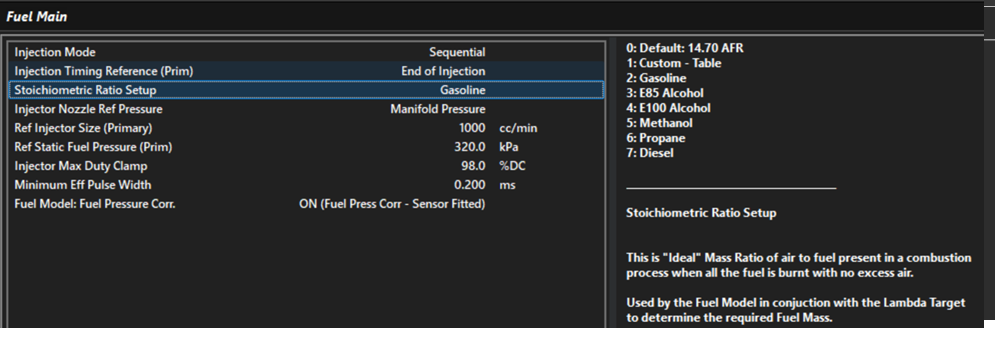
Figure 2
Stoich Ratio Setup (table)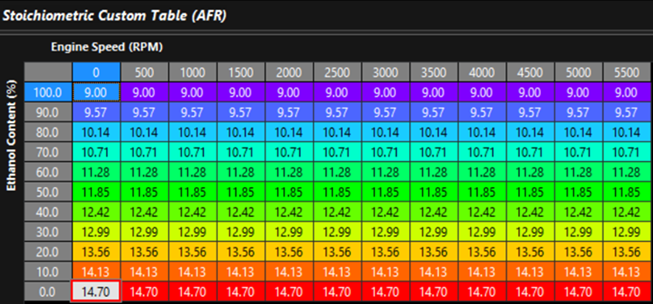
Figure 3
Notes on Effective Pusle width
Once the required Fuel Mass has been determined from the calculated Air Mass, the ECU calculates the effective injector pulse width using:
- Injector Size
- Fuel Density. Fuel density is used to convert between fuel mass and fuel volume and can be a function of both Fuel Temperature and Alcohol Content. A typical Fuel Density table is shown below in Figure 4
- Fuel Pressure Correction. Fuel Pressure Correction is based on the injector flow relationship described by Bernoulli’s Equation and allows the effective injector flow rate to be adjusted as the differential pressure across the injector changes.
Note: Fuel Pressure Correction is only applied when enabled using the Config -> Fuel -> Fuel Main → Fuel Pressure Corr. setting.
Fuel Density Table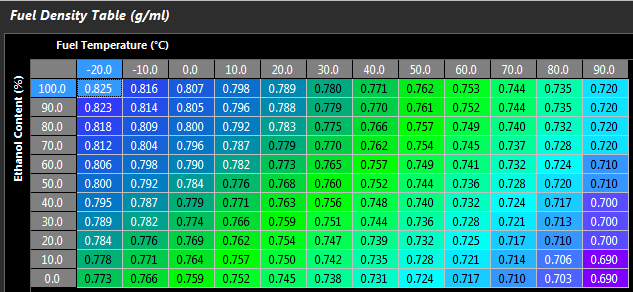
Figure 4