Windows 7
To setup the Ethernet on Windows 7 ready for the ECU connection use the following steps.
- Type “View Network Connections” into the search window, accessed from the start menu. Windows should provide a list of results. Select View Network Connections.
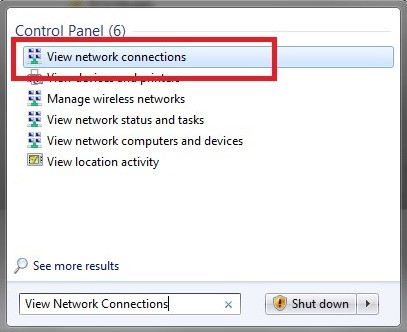
or alternatively if the search function doesn’t provide this:
Start > Control Panel > Network and Internet > Network and Sharing Center. Once in this menu select “Change Adapter Settings”
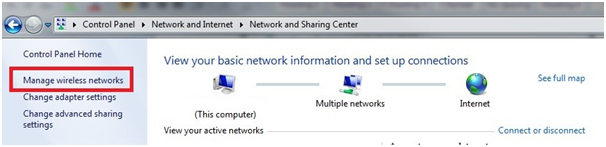
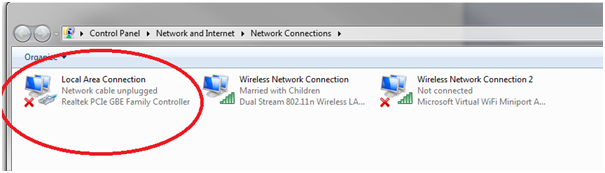
- The below menu should be visible. Select “Local Area Connection”
- Select TCP/IPv4 then click Properties
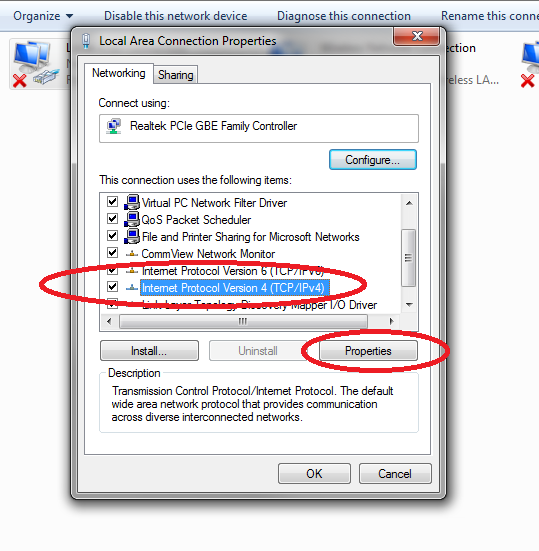
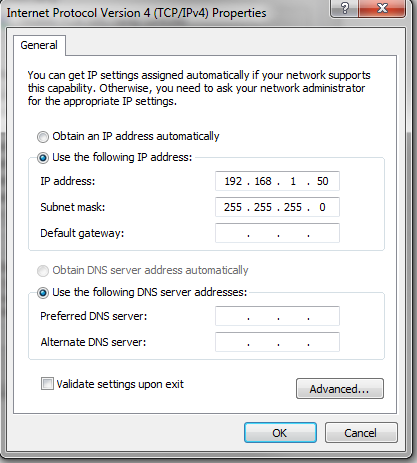
- Select “Use the following IP address” and enter in the address 192.168.1.50. The Subnet should automatically default to 255.255.255.0. Click OK.
- Done. Connect the Emtron Ethernet cable.