Overrun Boost (Anti-lag)
The Overrun Boost (ORB) or Anti-Lag System (ALS) can be switched ON from the Function Output Setup window.
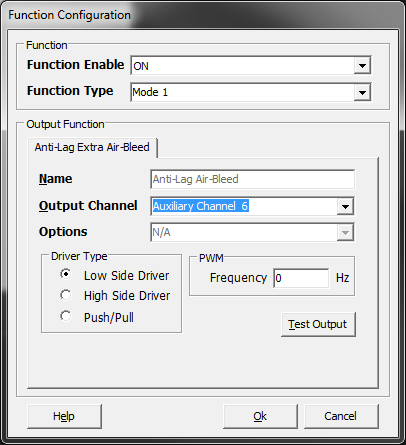
Currently Only Mode 1 is available.
Mode1 allows either:
- The Throttle plate is NOT permanently opened; the plate operates in its normal range.
- The Throttle plate is partially cracked opened. In this situation the “Cooldown Mode” MUST be set to ALWAYS ON. See tuning help section for more information. Cooldown ALWAYS On
Additional air is bleed into the engine using the existing Idle Speed Solenoid /Idle Speed Stepper/DBW. If DBW is enabled to ECU will automatically use this to provide addition air by using an Air Bleed Override Table. Otherwise the Idle Speed Mode selected will be used by the ECU to provide the addition air. i.e Solenoid or Stepper.
There is an option to add extra air using the Output Channel selection from the ORB Menu shown above. This option allows a device/solenoid to be switched ON or controlled using Duty Cycle from a 3D Table in the Tuning view. This table will ONLY be active when the Anti-Lag system is armed and is switched OFF in Cooldown mode.
ORB/Anti-Lag modes of operation.
This can be broken down into 4 modes:
- OFF. ORB function is switched OFF.
- Disarming/Standby Mode. The ORB function is ON but all the conditions required to Arm the system have not yet been met or the system has just completed cooldown and re-entered Standby mode.
- Armed. All the conditions required to arm the system have been met. The Ignition Retard, Ignition Cut, Fuel Enrich/Enlean, Air Bleed Override, Extra Air Bleed Tables are ALL active.
- Cooldown. In this mode ONLY the Cooldown Air Bleed Table is active, ALL on other tables are OFF. Extra air is bleed into the engine to help cool engine components. The ECU will limit the engine speed by applying a Fuel Cut.
This status information can be viewed from the Runtime Menu -> Motorsport Tab.
Enable RPM Table
This 3D capable look up table tells the ECU the desired RPM above which the ORFC can become active.
** RPM must exceed this value for ORFC to become active
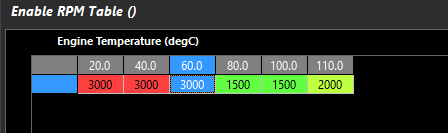
Above example shows just one axis using Engine Temperature.
Arming
There are three conditions used to arm the Overrun Boost System.
Before the Arming Conditions are evaluated the Engine Temperature MUST be less than “Maximum ET” setting and EGT1 and/or EGT2 less than the “Maximum EGT” setting.
Arming Condition 1. When the Engine Speed exceeds the RPM Arming threshold AND the Anti-Lag Arming switch in ON.
OR
Arming Condition 2. When the Throttle Position 1 exceeds the TPS1 Arming threshold AND the Anti-Lag Arming switch in ON.
OR
Arming Condition 3. When the User Channel (if selected) is ON AND the Anti-Lag Arming switch in ON.
NOTE: The Anti-Lag Arming Switch ONLY gets checked/used if an Input Source Channel has been selected.
Disarming
There are 4 conditions used to disarm the Overrun Boost System. Once disarmed the system enters Cooldown Mode.
Disarming Condition 1
The Engine Speed reduces below the RPM Arming threshold
AND
The Throttle Position drops below the TPS Arming threshold
AND
User Channel (if selected) is OFF
AND
Disarming Time is reached.
OR
Disarming Condition 2
The Anti-Lag Arming switch is OFF. The System Immediately enters Cooldown Mode.
OR
Disarming Condition 3
The Engine Temperature exceeds Maximum ET Setting. The System Immediately enters Cooldown Mode.
OR
Disarming Condition 4
The EGT1 and/or EGT2 Temperature exceeds Maximum EGT Setting. The System Immediately enters Cooldown Mode.
Disarming Timer
When the RPM and TPS Disarming conditions are met (i.e RPM < threshold AND TPS < threshold) the timer starts counting. When the Disarming Time is reached (without any arming condition being met) the system enters cooldown mode.
Cooldown
Cooldown Always ON
Normally required when the Throttle plate is permanently cracked opened. As the throttle plate is opened bleeding addition air into the engine, when the ORC is disarmed the ECU uses cyclic limiting to control Engine Speed.
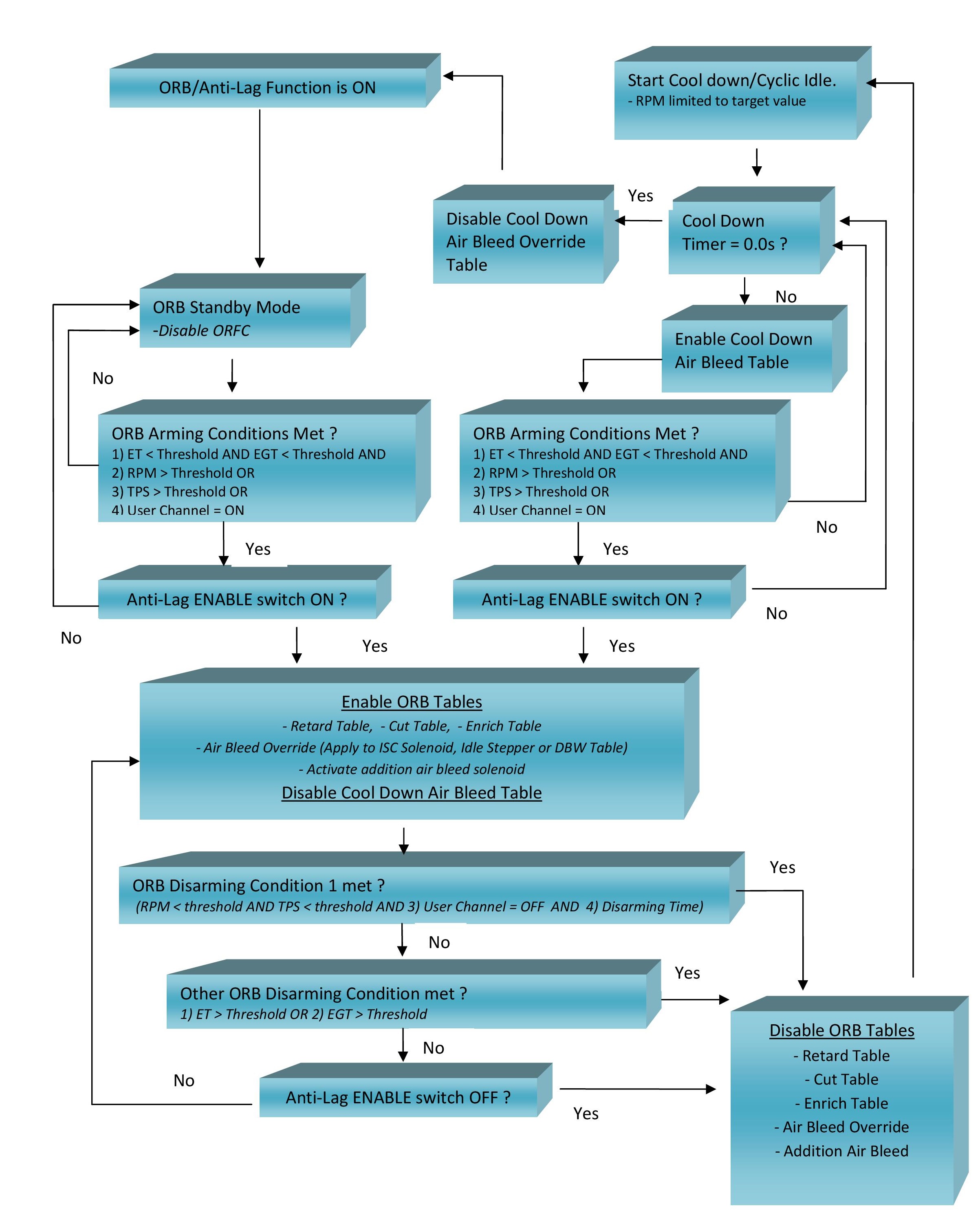
When set to ON the Standby Mode is never used. See the ORB Flow Chart for more information.
Cooldown Idle Target
Target Engine Speed with ORB is operating in Cooldown/Cyclic Idle Mode.
Typical Value = 1500 RPM
Cooldown Timer
The length of time the ORB will operate in Cooldown/Cyclic Idle mode before returning to Standby mode.
Cooldown TPS Hi
When TPS1 Signal is above this value the engine speed is not limited to the Cooldown Idle Target. Between TPS1 Lo and TPS1 Hi the ECU will remove the Cooldown Idle limit . This allows the vehicle to be drive while still in cooldown mode.
TPS Hi MUST be greater than TPS Lo
Cooldown TPS Lo
When TPS Signal is below this value the Engine Speed will be limited to the Cooldown Idle Target.
TPS Hi MUST be greater than TPS1 Lo
Flow Diagram
Overrun Boost Status
The following Status information is available from the “Anti-Lag Status” runtime
- 0 = Function is OFF
- 1 = System is waiting in standby mode. This means no Retard, Cut, Fuel or additional Air Bleed
- 2 = System is OFF as the Engine Speed is zero.
- 3 = System is OFF as the Anti-Lag Enable Switch “Input Source” is selected but the switch is OFF.
- 4 = System is ON. The following tables are active
- Ignition Retard
- Ignition Cut
- Fuel
- Air Bleed Override
- Extra Air Bleed Table
- 5 = Cooldown Mode. System has disarmed and entered cooldown/Cyclic Idle mode
- 6 = Cooldown Mode High ET. The Maximum Engine Temperature has been exceeded and the ECU has forced the Anti-Lag system into Cooldown mode.
- 7 = Cooldown Mode High EGT. The Maximum EGT has been exceeded and the ECU has forced the Anti-Lag system into Cooldown mode.
- 8 = Cooldown ALWAYS ON. The Cooldown mode is running in the “Always ON” setting.