Data Logging
The TCM has a built-in data logger that records selected channels to eMMC memory.
| Logging Specs | |
|---|---|
| Max Capacity | 8GB |
| Max Channels | 500 |
| Max Frequency | 1000 Hz |
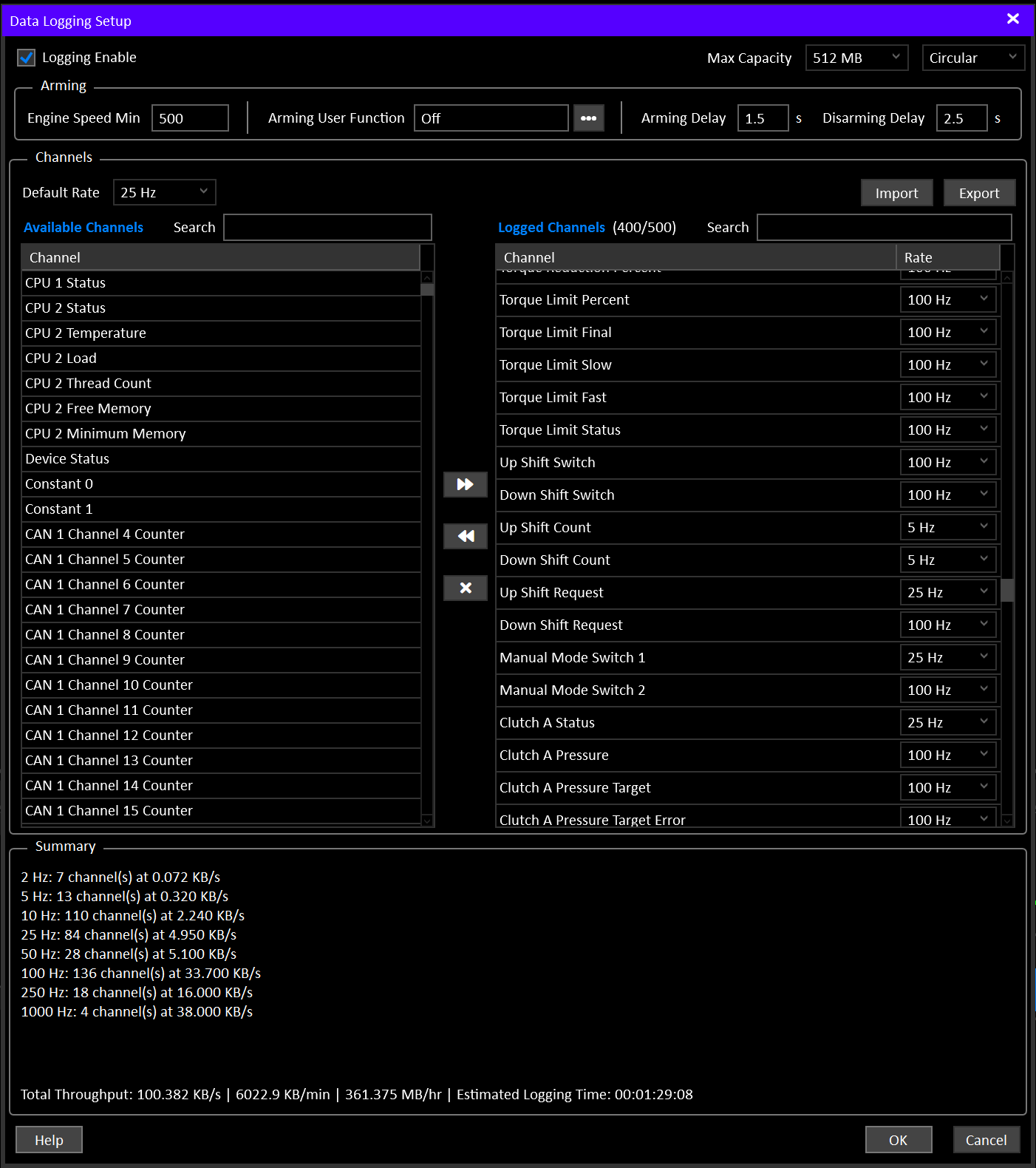
Logging Enable must be ON in Data Logging Setup, and at least one channel must be selected. With Logging Enable OFF the logger is completely inactive and ignores all arming conditions.
Sessions
Each time the logger arms, a new recording session starts. Everything recorded until it disarms belongs to that session.
A single download can contain many sessions (e.g. several on/off cycles across a track day). When the log is downloaded, all sessions are joined together in time order, with a marker at each session boundary so they can still be told apart on a chart.
Channels
A maximum of 500 channels can be selected for logging.
Each channel can be recorded at any of the following frequencies:
- 1 Hz
- 2 Hz
- 5 Hz
- 10 Hz
- 25 Hz
- 50 Hz
- 100 Hz
- 250 Hz
- 500 Hz
- 1000 Hz
Each frequency option can have a maximum of 255 channels assigned.
For Example: You can choose 255 channels at 100 Hz and 100 Channels at 50Hz, but you cannot choose 355 channels at 100 Hz.
Channels are moved from Available Channels into Logged Channels, where each one is assigned a rate. Default Rate sets the rate newly added channels start at, and the rate of several channels can be changed at once from the right-click menu. The setup screen will not allow either channel limit to be exceeded.
A channel list (channels and rates) can be saved to a file and reloaded with Export and Import. This is useful for keeping a few standard setups (e.g. “track day”, “dyno session”) and switching between them, or between vehicles.
Tip
To maximize memory usage, only log channels as fast as necessary.
- Slow moving signals like temperature’s only need to be 5-25 Hz
- Fast moving signals like clutch pressure benefit from being faster (100-250 Hz)
Capacity
The maximum capacity of the logging memory is a little under 8GB. Some space is reserved for config storage and other system functions. The memory capacity used by the Data Logging system can be set from 128MB to 8GB. Downloading a log from a fully filled 8GB capacity will take a very long time (over an hour), so it can be useful to limit the maximum logging capacity to make it more practical.
One-Shot / Circular Mode
Data logging can be used in two distinct modes:
- One-Shot: Once full, logging stops. No new data is recorded until the memory is erased.
- Circular: Once full, the oldest data will be overwritten with new data.
Circular mode is extremely useful for set and forget logging. You can enable it and leave it running. In the event that something happens that you want to review, the most recent data will always be available.
Limiting the total capacity in circular mode makes periodic log downloads more manageable.
Example:
A typical “full coverage” logging set might have 400 channels in it. Setting the capacity to 512MB might result in about 1.5 hours of total logging time, which will only take a couple of minutes to download in the event that you want to review it.
Partial Sessions
In circular mode, when the logging capacity is reached and a logging session is still recording, writing wraps back to the start of the memory, overwriting the oldest session data. A session that gets overwritten will loose it’s channel information first, followed by it’s oldest data. If the user has not changed the logging channel selection or frequencies, the partially overwritten data can still be decoded as it’s channel layout will match the newer sessions. If the user changes the channel or frequency layout, the entire old session will be lost.
Note
Switching from Circular back to One-Shot after the log has wrapped will erase the log. Once data has been overwritten in a loop, there is no single continuous recording left to keep.
Estimated Logging Time
Data Logging Setup shows a live Estimated Logging Time for the selected channels and rates. This is the figure to check before a recording session.
As a guide to the scale involved, the table below uses 10 channels at a single rate, assuming a typical mix of channel sizes:
| Rate | Data rate | Fills 1 GB in | Fills 8 GB in |
|---|---|---|---|
| 1 Hz | ~40 B/s | ~310 days | ~6.8 years |
| 2 Hz | ~80 B/s | ~155 days | ~3.4 years |
| 5 Hz | ~200 B/s | ~62 days | ~1.4 years |
| 10 Hz | ~400 B/s | ~31 days | ~249 days |
| 25 Hz | ~1.0 KB/s | ~12.4 days | ~99 days |
| 50 Hz | ~2.0 KB/s | ~6.2 days | ~50 days |
| 100 Hz | ~4.0 KB/s | ~3.1 days | ~25 days |
| 250 Hz | ~10 KB/s | ~30 hours | ~10 days |
| 500 Hz | ~20 KB/s | ~15 hours | ~5 days |
| 1000 Hz | ~40 KB/s | ~7.5 hours | ~2.5 days |
Logging 10 channels at every rate at once (100 channels) comes to roughly 76 KB/s, which fills 1 GB in around 4 hours and 8 GB in around 31 hours. Choosing a sensible rate for each channel is the biggest factor in how long a recording lasts.
Arming / Disarming
The logger can be armed in a number of ways:
| Condition | Description |
|---|---|
| Logging Enable Switch | When ON, the logger will run as long as Engine Speed Min is exceeded. |
| Arming User Function | The logger will run when the selected User Function is ON and Engine Speed Min is exceeded. |
Info
If Engine Speed Min is greater than zero, it will lockout the logger until it’s exceeded.
If the Logging Enable Switch is OFF AND Arming User Function is OFF, the logger will enable when Engine Speed Min is exceeded. This is the absolute minimum required arming condition.
Arming / Disarming Delays
- Arming Delay: Delays arming until the arming conditions have been true for the delay time (0-25 seconds).
- Disarming Delay: Delays disarming until the arming conditions have false for the delay time (0-25 seconds).
Downloading
Logging is paused while a log is downloaded, and resumes automatically afterwards if the logger is still armed. Logging and downloading cannot happen at the same time.
Before downloading, the number of sessions recorded since the last erase and how full the memory is are shown. If nothing has been recorded since the last erase, Download and Erase are unavailable.
Downloads run over Ethernet at roughly 1.5 MB/s. As a guide, a full 1 GB log takes around 12 minutes to download, and a full 8 GB log around an hour and a half.
Once downloaded, a Log Details screen is shown before the log file is saved. Vehicle and Transmission are filled in from the Device Label and Transmission Label settings, and the remaining details (driver, venue, weather, notes, etc.) can be added.
Erasing
Erasing clears the entire log. Logging is paused and resumed automatically around the erase, and confirmation is requested if the log contains data.
Log Markers
When configured, the Log Marker Switch input can be used to mark moments in time in the logged data.
On the rising edge of the switch, the next single batch of log data will be marked. This mark will show up in the plotted data as a dotted blue line.
Power Loss Behavior
The logging system commits data from RAM to permanent memory approximately once per second. The TCM should be wired to be in control of it’s own power supply. This allows it to shutdown the data logging system and ensure that any pending data sitting in RAM is committed before powering itself down.
In the event of an unexpected power loss, any data still in RAM will be lost. This is typically ~1 second worth of data.