Launch Control
Warning
Launch Control is a motorsport orientated function can lead to transmission and/or other driveline component damage if not used correctly.
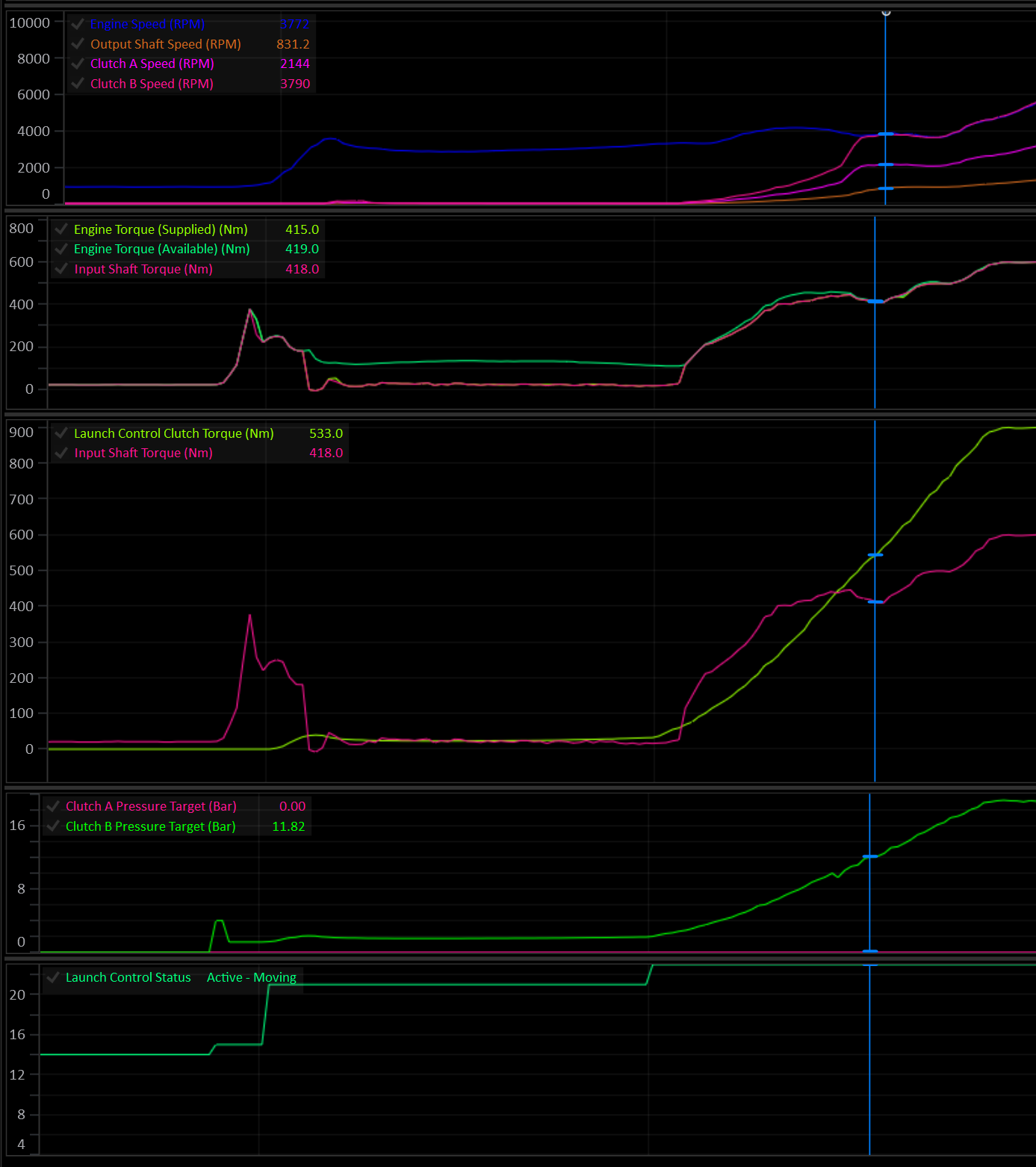
Overview
Launch Control can be configured in a variety of way depending on the desired control outcome.
Launch control can be configured to:
- Control clutch torque and clutch torque rate.
- Generate an Engine Speed Target to be sent to the engine.
- Generate a torque limit to to be sent to the engine.
There are 5 main states/phases the Launch system can be in:
| State | Meaning |
|---|---|
| Disarmed | Off, or arming conditions not currently met. |
| Armed | Arming conditions met, waiting for launch lockouts to clear. |
| Static | Car stationary, launch active. Clutch is typically held open/slipping to a torque target. |
| Preload | (Optional) Clutch is pre-loaded to a torque target for a fixed dwell time before the final dump. |
| Moving | Clutch torque is actively controlled through the launch. Ends when a disarm condition is met. |
Set Enable to ON in Launch Control Setup to turn Launch Control on. While disabled, it has no effect on clutch pressure, engine speed target or torque limit.
Clutch Control
The primary function of Launch Control is to override the clutch pressure by generating a clutch torque request.
Clutch Control is enabled in Launch Control Setup.
Launch Control never engages a clutch that isn’t already part of the currently selected gear. It can only override the pressure target of a clutch the TCM has already activated for that gear. It cannot bring in an extra clutch on its own.
Launch Control Clutch Select
Care should be taken to ensure the Launch Control Clutch Select table is set up correctly. In most case the table will be identical to the Takeup Clutch Select table.
Important
The Clutch Select table’s X axis MUST be Clutch #.
The table is re-evaluated each time the system re-arms into the Static phase. This allows the table’s Y axis to be another channel such as Gear.
When Clutch Control is disabled, Launch Control does not touch clutch pressure at all — only the engine RPM target / torque limit outputs (if enabled) are active.
Arming & Disarming
Arming
The system arms when every configured arming condition is simultaneously true. Each condition is independently optional (Eg: 0 = OFF). Enable only the conditions relevant to your application.
At least one condition must be configured, or the system will report “Disarmed - No Arming Config” and never arm.
| Condition | Enable via | Threshold |
|---|---|---|
| Launch Switch | Launch Arming Switch = ON | Launch Arming Switch = ON |
| Brake Switch | Brake Switch Arming = ON | Brake Switch 1 = ON |
| Brake Pressure | Arming Brake Pressure Minimum > 0 | Brake Pressure Front > Threshold |
| Transbrake Switch | Transbrake Switch Arming = ON | Transbrake Switch= ON |
| User Function | Arming User Function ≠ Off | User Function # Status = ON |
Static → Moving
Releasing any configured arming condition while in Static or Preload is what triggers the transition into Preload/Moving.
Lockouts (Armed → Static)
Once armed, the system waits for all configured lockouts to clear before entering the Static phase.
At least one lockout must be configured, or the system will report “Lockout - No Lockout Config” and will not enter Static.
| Lockout | Enable via | Condition to clear |
|---|---|---|
| Gear | Always active | Gear ≥ 1st |
| Clutch By Wire | Always active | CBW must not be active |
| Pedal/throttle position | Static Lockout Pedal/Throttle Position > 0 | Pedal Position* ≥ Threshold |
| Output Shaft Speed | Static Lockout Output Shaft Speed > 0 | Output Shaft Speed < Threshold |
| Drive Speed | Static Lockout Drive Speed > 0 | Drive Speed < Threshold |
| Engine speed | Static Lockout Engine Speed > 0 | Engine Speed > Threshold |
| User Function | Static Lockout User Function ≠ Off | User Function # Status = ON |
* If
Pedal Positioninput is not configured,Throttle Positionis used.
Disarming (Static / Preload / Moving → Disarmed)
While active, the system aborts back to Disarmed immediately if:
- The TCM begins a shift.
- The gear selector leaves Drive/Manual (enters Park/Neutral/Reverse)
- Any one of the following (each optional) stays true for longer than the
Disarming Time(ms):
| Disarm condition | Enable via | Trips when |
|---|---|---|
| Pedal/Throttle Position | Disarming Pedal/Throttle Position > 0 | Pedal Position* < Threshold |
| Output Shaft Speed | Disarming Output Shaft Speed > 0 | Output Shaft Speed > Threshold |
| Drive Speed | Disarming Drive Speed > 0 | Drive Speed > Threshold |
| Engine Speed | Disarming Engine Speed > 0 | Engine Speed < Threshold |
| Clutch Slip | Disarming Clutch Slip > -1000 | Clutch Slip < Threshold (clutch locked) |
* If
Pedal Positioninput is not configured,Throttle Positionis used.
If no disarming condition is configured, the system disarms immediately (nothing is holding it active).
Active Launch Phases
Static
In the Static phase the car is stationary with the engine is held at the desired launch RPM (this is to be controlled by the engine ECU). The TCM can generate a torque limit and/or Engine Speed Target to be issued to the engine via CAN.
Static Clutch Torque: Typically the clutch is either fully open or a small amount of torque is applied for the engine to load up against.
Caution
Applying clutch torque during static phase will lead to very high clutch temperatures and should be treated with caution.
Preload (optional)
Enabled when Preload Stage = ON in Launch Control Setup.
Preload is a dwell phase between Static and Moving where the clutch can be held at a preload torque target for a calibrated time, before the final dump.
It can be triggered in three ways:
| Trigger | Enable via | Behaviour |
|---|---|---|
| Auto | Preload Stage = ON, Preload User Enable = OFF, Preload Switch = OFF | Entered automatically the instant the arming condition is released. |
| Preload Switch | Preload Switch = ON | Entered as soon as Launch Preload Switch = ON. Can be requested before the arming condition is released, to preload ahead of the Moving phase. |
| Preload User Enable | Preload User Enable ≠ OFF | Entered as soon as User Function # Status = ON. Can be requested before the arming condition is released, to preload ahead of the Moving phase. |
Preload → Moving
- Preload will exit to Moving when
Launch Control Preload Timetable value expires, orMax Preload Timeexpires. - If Preload was entered manually (User Function or Preload Switch) rather than automatically, releasing the arming condition while still in Preload will cut it short and transition immediately to Moving.
Preload Clutch Torque: Typically, a small amount of torque is applied for the engine to load up against. The clutch torque rate is relatively slow so the engine doesn’t suddenly get dragged down.
Example:
- The driver arms launch with the
Launch Switchand enters Static. - A generous but not excessive time is entered into the Preload Time table (and Max Preload Time).
- Moments before launching the
Preload Switchis pressed and the system enters Preload. - Clutch pressure is ramped up & engine torque increases.
- Before the
Launch Preload Timeexpires, theLaunch Switchis released at the exact moment the driver wishes to launch. - The system then enters the Moving phase and ramps the clutch up to full lock torque.
In this scenario, the clutch can be loaded before launching, clutch temperature is minimised, and the driver is still in full control of the moment of launch.
Moving
During the moving phase, clutch torque is ramped up to full lock torque at a controlled rate.
Moving Clutch Torque: The final clutch torque should result in the clutch being fully locked. In a properly modelled system, the clutch will lock when it’s applied torque meets or exceeds the Input Shaft Torque. In a multi-clutch transmission with gear clutch load factors other than 1.0, this may vary and should be considered.
Moving Clutch Torque Rate: Clutch torque should be ramped in fast enough to minimise slip and engine flaring, while not dragging the engine speed down.
Tip
Most of the fine tuning time will be spent dialing in a suitable Moving Clutch Torque Rate.
Per-Phase Calibration Tables
Each of Static / Preload / Moving phases has its own set of tables. Torque Limits are enabled per-phase.
| Output | Enable via (per phase) | Table(s) |
|---|---|---|
| Engine Speed Target | Engine Speed Target Tables = ON (applies to all 3 phases) | Static/Preload/Moving Engine Speed Target |
| Engine Torque Limit | Static/Preload/Moving Torque Limit = ON | Static/Preload/Moving Torque Limit |
| Clutch Torque | Clutch Control = ON (applies to all 3 phases) | Static/Preload/Moving Clutch Torque |
| Clutch Torque Rate | Clutch Control = ON (applies to all 3 phases) | Static/Preload/Moving Clutch Torque Rate |
A phase’s torque limit is only applied while that phase is active. It’s released as soon as Launch Control moves to a phase without one, so a limit is never carried over from an earlier phase.
Runtime Channels
The following runtime channels are generated by the Launch control system:
- Launch Control Status (see Launch Control Status enumeration)
- Launch Control Engine Speed Target
- Launch Control Torque Limit
- Launch Control Clutch Torque
- Launch Control Static Time
- Launch Control Preload Time
- Launch Control Moving Time
Launch Control Status reports the current phase, or which arming condition or lockout is being waited on, which makes it the first channel to check when Launch Control won’t activate. The Static, Preload and Moving Time channels record how long each phase of the most recent launch took, for review after the run.
Interaction with Other Systems
Caution
Care should be taken to ensure other system lockouts are configured, in particular: Takeup.
- Transbrake: Transbrake clutches are unconditionally part of the active clutch set while held; Launch Control can overlay pressure on them like any other active clutch but never adds to the set itself.
- Takeup: If Takeup’s own
Launch Control Lockoutoption is set, Takeup control locks itself out whenever Launch Control is active (Static/Preload/Moving), so the two won’t fight over clutch pressure. - Clutch-By-Wire (CBW): An active CBW request blocks Launch Control from ever reaching Static (see lockout table above).