Takeup
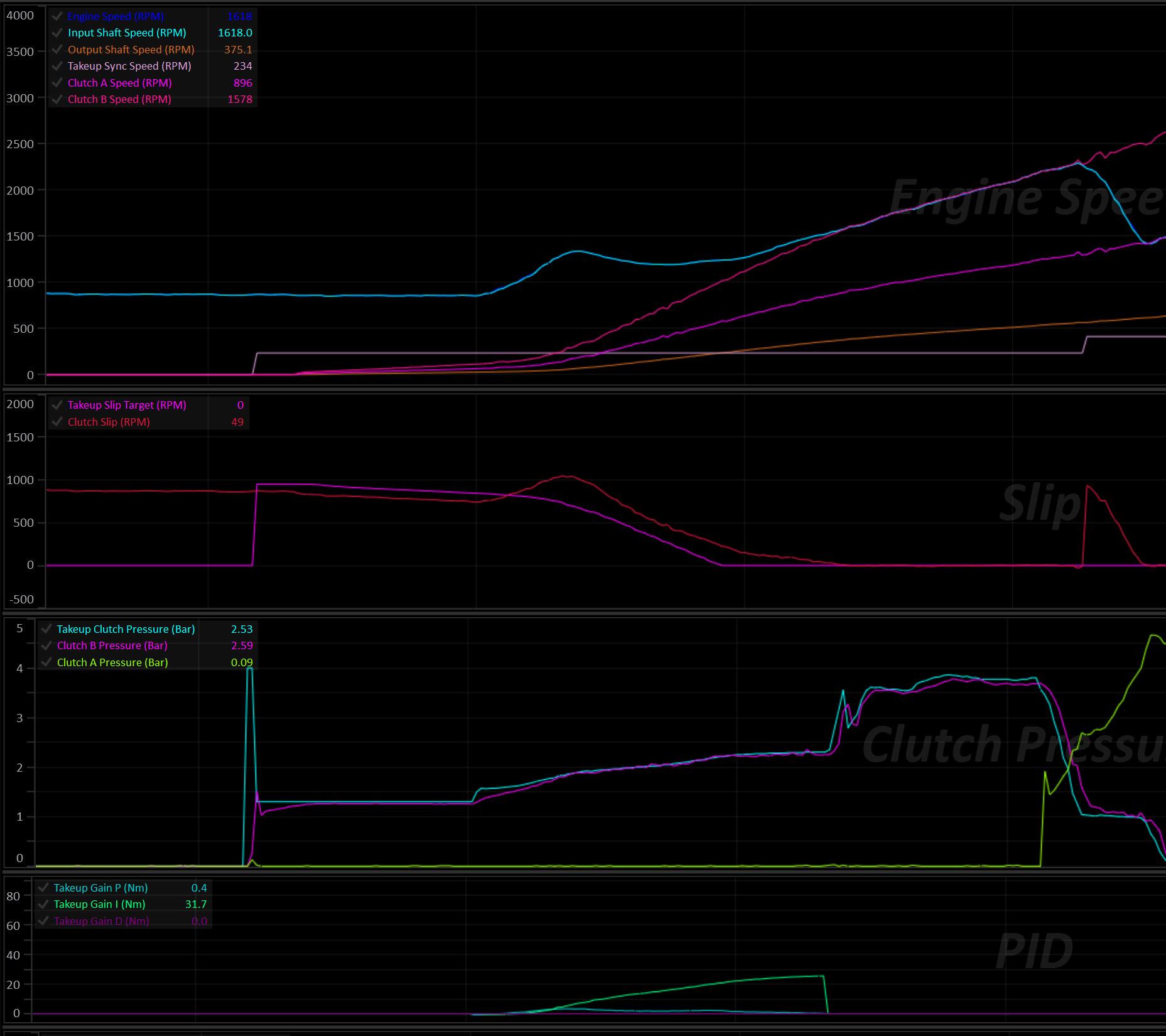
Takeup manages the smooth application (and release) of clutch torque from a standing start. The equivalent of a driver gently feeding out a manual clutch pedal, done automatically. It’s a critical function for dual-clutch transmissions, and an optional feature on multi-clutch transmissions that are also equipped with a torque converter.
Takeup doesn’t select gears or bring in extra clutches on its own — it only takes over the pressure of whichever clutch is already engaged for the current gear, for as long as the car is moving off from (or slowing to) a stop.
Enabling and Selecting the Clutch
Set Enable to turn Takeup on. Once enabled, the Takeup Clutch Select table determines which clutch Takeup is allowed to take control of, per gear. This only has effect for a clutch that’s already part of the active clutch set for the current gear; it cannot bring in a clutch on its own. Configure one clutch per gear for a standard standing-start setup.
Takeup Clutch Select Table
- X Axis: MUST be
Clutch #. - Y Axis: MUST be
Gear.
Select a clutch for each gear, even if it’s not intended for normal operation.
If a clutch is not selected for the current gear, the Takeup system will not arm in that gear. In the event of a failure where the transmission is forced to stay in a unintended gear, this may result in the car being undriveable.
Speed Target Mode
Speed Target Mode sets what the closed-loop slip controller is trying to synchronize to.
| Mode | Behaviour |
|---|---|
| Off | Takeup Target Mode is 0 — Takeup is disabled regardless of the Enable setting. |
| Engine Speed | The Takeup Engine Speed Target table gives a target Engine Speed. The controller works out the clutch slip and synchronous Output Shaft Speed needed to bring the engine to that RPM in the current gear. |
| Input Shaft Speed | The Takeup Input Shaft Speed Target table gives a target Input Shaft Speed directly, again converted to a slip target and synchronous Output Shaft Speed for the current gear. |
| Clutch Slip | The Takeup Slip Target table is used directly as a raw the clutch slip target. No speed synchronization is calculated. |
In all three modes, as the car accelerates and Output Shaft Speed approaches the calculated Takeup Sync Speed, the required slip target tapers down toward zero — this is what lets the clutch lock up smoothly instead of stepping straight from “slipping” to “locked”.
Takeup States
Takeup is a 5-state machine:
| State | Meaning |
|---|---|
| Off | Function disabled, or just enabled while already moving faster than the Arming Output Shaft Speed. |
| Ready | Car stopped/slow. Clutch is held at a small Initial Clutch Torque (optionally preceded by a Fast Fill pulse). Waiting for the driver to get on the throttle. |
| Active | The car is actually launching. A closed-loop controller slips the clutch through to lock-up, tracking the Speed Target Mode’s target. |
| Exit | Takeup Sync Speed and Takeup Slip Target have been met. Pressure ramps the rest of the way up to full lock-up at a dedicated rate. |
| Driving | Fully locked, normal driving. Takeup is watching Output Shaft Speed in the background in case the car slows back down to a stop. |
Ready → Active
The transition from Ready to Active happens once all of the following are true:
- Brake Switch is off
- Pedal/Throttle is above Pedal/Throttle Min
- Engine Torque (Supplied) is above Engine Torque Min.
The system transitions back to Ready if any of the same three conditions reverse (with a small amount of built-in hysteresis so it doesn’t chatter back and forth right at the threshold).
Ready → Exit
If the car picks up speed past Takeup Sync Speed while still in Ready, before the driver has touched the pedal (e.g. rolling away on a hill, or creeping forward under a positive Initial Clutch Torque), Takeup skips Active and goes straight to Exit. The clutch is ramped up to full lock at the Takeup Exit Pressure Ramp Rate rather than sitting at Initial Clutch Torque while the car outruns it. This doesn’t happen while Bleed Off is active.
Active → Exit
Once Output Shaft Speed has risen above the calculated Takeup Sync Speed and Clutch Slip has fallen below the Exit Slip Threshold, the system hands off to the Exit state. The clutch pressure is ramped the rest of the way to full pressure at the Takeup Exit Pressure Ramp Rate.
If Output Shaft Speed falls back below Takeup Sync Speed (minus Output Shaft Speed Sync Hysteresis) before the ramp finishes, it returns to Active rather than continuing to lock up.
Exit → Driving
Once the ramped pressure has caught up to the normal fully-locked clutch pressure, Takeup hands off to the Driving state and stops actively managing that clutch’s pressure.
Driving → Active (coming back down to a stop)
Takeup continuously compares Output Shaft Speed against a re-arming point: Takeup Sync Speed (minus Output Shaft Speed Sync Hysteresis), optionally adjusted earlier by Decel Arming Lead Time during a fast deceleration so the release has a head start rather than only reacting once the car has nearly stopped.
If Arming Output Shaft Speed is set above 0, Output Shaft Speed must also drop below that fixed speed before Takeup re-arms. Set it to 0 to rely on the synchronous-speed comparison alone.
Caution
Pay attention to the table axis setup of the selected slip target table. The Takeup Sync Speed will likely move around if the table is spanned against channels such as Pedal Position. This can result in unintended Takeup re-arming. The Arming Output Shaft Speed setting is useful for eliminating this concern.
Stall-Saver: If Output Shaft Speed drops to the point that Input Shaft Speed would fall below the transmission’s configured Input Shaft Speed Min, Takeup re-arms immediately regardless of the above.
The same re-arming point also gates the way back out. Active (and Ready, when the car rolls past sync on its own) won’t hand off to Exit until Output Shaft Speed is above the re-arming point plus Output Shaft Speed Sync Hysteresis (or above Takeup Sync Speed, whichever is higher). This stops a fast coast-down from bouncing between Exit and Active, which would otherwise show up as a saw-tooth on the clutch pressure.
Lockouts
Takeup is held out of operation — clutch pressure and state are frozen — whenever any of the following are true:
| Lockout | Condition | Cooldown |
|---|---|---|
| Engine stopped | Engine Speed = 0 RPM | — |
| Neutral / Park | Selected Gear = Neutral or Park | — |
| User Lockout | The assigned User Function is OFF (only checked if one is assigned) | — |
| Clutch By Wire | Clutch By Wire Scaler is below Clutch By Wire Lockout (set the lockout to 100% to disable this check entirely) | Clutch By Wire Lockout Cooldown Time |
| Transbrake | Enabled via Transbrake Lockout; trips while the Transbrake is on or in its bump cooldown | Transbrake Lockout Cooldown Time |
| Launch Control | Enabled via Launch Control Lockout; trips while Launch Control is active | Launch Control Lockout Cooldown Time |
The Clutch-By-Wire, Transbrake, and Launch Control lockouts each have their own cooldown timer. Once the underlying condition clears, Takeup stays locked out for the configured cooldown period before it’s allowed to resume, rather than snapping back on the instant the condition goes away. When Takeup comes back out of one of these three lockouts, it re-evaluates whether the car is already moving fast enough to go straight to Driving, or whether it should resume in Ready.
Tip
If Takeup is enabled alongside Launch Control’s clutch override, it’s strongly recommended to enable the Launch Control Lockout so the two systems don’t fight over the same clutch.
Bleed Off
When enabled, Bleed Off removes all pressure from the takeup clutch, so it’s ready to fill from empty. It can be triggered by the Brake Switch (Bleed Off with Brake Switch) and/or the Takeup Bleed Off Enable table.
Two optional lockouts prevent Bleed Off from kicking in:
- Bleed Off Pedal/Throttle Max
- Bleed Off Output Shaft Speed Max
Above either one, Bleed Off is locked out even if the brake/table would otherwise call for it. Setting one of these lockouts to 0 will disable that particular check.
Fast Fill
Once Bleed Off ends (e.g. the brake is released), the clutch chamber has to be filled from empty before it can hold any torque. Fast Fill Pressure and Fast Fill Time open the solenoid to a higher target pressure for a short period to fill the chamber quickly.
Too much of either and the clutch will grab; too little and take-up will feel soft/delayed.
Initial Clutch Torque
After the fill, the clutch is held at Takeup Initial Clutch Torque (a torque value, converted to a pressure using the clutch’s own torque/pressure model and touch point) while waiting in Ready for the driver to get on the throttle. A positive value here makes the car creep, like a manual gearbox car with the clutch slightly out.
Active State: Closed-Loop Control
Once Active, clutch torque is the sum of a feed-forward term and a PID correction, clamped to Takeup Torque Min/Takeup Torque Max, then converted to a pressure via the clutch’s torque/pressure model and added to its touch point.
Feed forward — set via Torque Feed Forward Mode:
- User Defined — looked up directly from the Takeup Clutch Torque Feed Forward table.
- Calculated (Experimental) — derived automatically from input shaft torque and the current slip ratio. It’s recommended to start with the User Defined table and let the PID do most of the work rather than relying on the experimental mode.
PID control closes the gap between actual clutch slip and the target computed from Speed Target Mode, using:
- Proportional Gain
- Integral Gain
- Derivative Gain
- Integral Min / Integral Max
The resulting torque command is converted to pressure and then rate-limited by Takeup Pressure Positive Ramp Rate/Takeup Pressure Negative Ramp Rate so the clutch can’t be commanded to move faster than the driveline can physically respond to.
An engine torque limit (optional, via Torque Limit = ON in Takeup Setup) applies the Takeup Engine Torque Limit to the engine while the clutch is actively slipping, to stop the slipping clutch from being overdriven (see Engine Torque Limiting).
Engine Torque Limiting
Two separate, independent torque limits can apply while Takeup is running:
- Takeup Engine Torque Limit: Applies continuously while the clutch is in Active or Exit (i.e. actively slipping). This protects the slipping clutch from being overdriven by the engine.
- Shift Torque Limit: Applies only if a gear shift starts while Takeup is Active — it caps engine torque to 0 Nm for the duration, to stop the engine flaring and the clutch grabbing hard as the shift completes and control hands back to Takeup.
Both limits automatically defer to Launch Control’s torque limit if Launch Control is also active, so the two functions don’t fight each other.
Interaction with Automatic Shifting
Suppress Auto Mode Up Shifts During Takeup and Suppress Auto Mode Down Shifts During Takeup independently block automatic up/down shifts for as long as Takeup is actively slipping the clutch (Active or Exit), so a shift can’t be requested out from under an in-progress launch. Manual shift requests are not affected.
Runtime Channels
The Takeup system generates the following runtime channels:
- Takeup Status (see Takeup Status enumeration)
- Takeup Slip Target
- Takeup Slip Error
- Takeup Sync Speed
- Takeup Clutch Pressure
- Takeup Torque Feed Forward
- Takeup Clutch Torque
- Takeup Gain P
- Takeup Gain I
- Takeup Gain D