Transbrake
Warning
Transbrake is a motorsport orientated function can lead to transmission and/or other driveline component damage if not used correctly.
The Transbrake function locks up the transmission so that engine load can be applied against the torque converter for staging and launching. It works by applying additional clutches along with the clutches required for the current forward gear. Typically this is achieved by engaging Reverse and First gear at the same time, effectively binding the transmission.
Transbrake Mode
The Mode setting in Transbrake Setup has two modes of operation:
- On (Forward + Reverse): Engages the clutches for reverse AND the current forward gear (eg: 1st).
- Clutch Select Table: User definable clutch selection, from the Transbrake Clutch Select table, to be applied in combination with the current forward gear’s clutches.
Activation
The Transbrake is activated by the Transbrake Switch input. The switch input is configured separately in Input Config.
Lockouts
Any of the following lockout conditions will result in the Transbrake being disabled. Transbrake Status shows which one is active.
- Max Output Shaft Speed: If the output shaft speed exceeds this value, the Transbrake is disabled.
- Max Gear: The transbrake will be disabled above this gear.
- Not in a forward gear: The Transbrake only works in a forward gear.
- User Enable: A User Function can be selected to act as a lockout. The selected User Function must be ON or the Transbrake will be disabled.
- Clutch By Wire: An active Clutch By Wire request disables the Transbrake.
Torque Limit
With Torque Limit ON in Transbrake Setup, the Transbrake Torque Limit table is sent to the engine as a torque limit for as long as the Transbrake Switch is on, bumps included.
Bump
During a bump, the Transbrake is momentarily released to allow the car to increment forward for staging.
Bump is activated by the Transbrake Bump Switch input. The switch input is configured separately in Input Config.
- Bump Time: The Transbrake is released for this amount of time, regardless of the Bump Switch being held for longer.
- Bump Cooldown Time: After a bump, another one cannot be requested until this time has elapsed.
Repeated Bumps
To request subsequent bumps, the Transbrake Bump Switch switch must be released and re-pressed. Holding the bump switch will not result in repeated bumps.
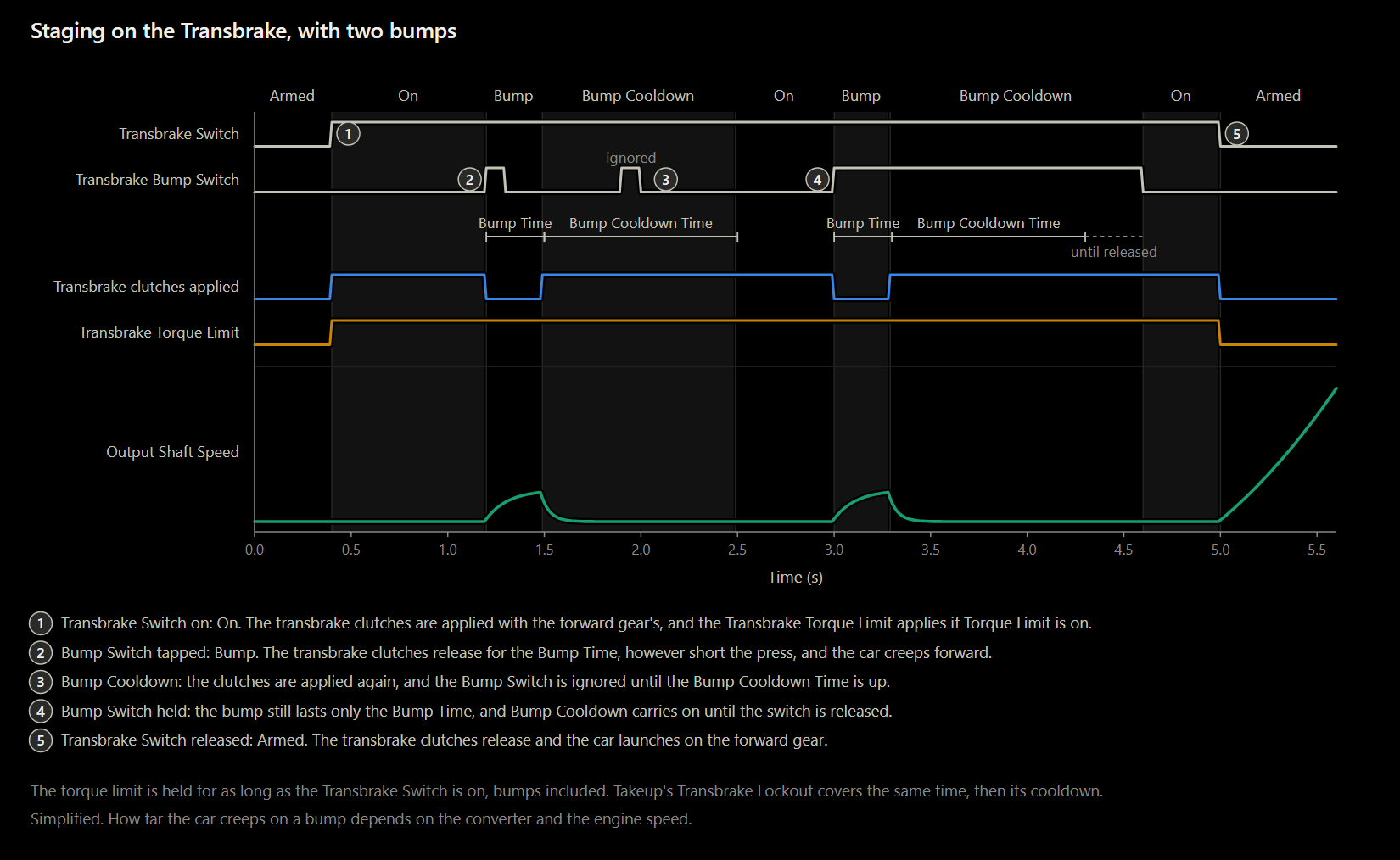
The Transbrake is applied again during the Bump Cooldown, and presses of the Bump Switch are ignored until it’s over. A held Bump Switch keeps it in Bump Cooldown until it’s released.
Interaction with Other Systems
Caution
Care should be taken to ensure other system lockouts are configured, in particular: Takeup.
- Takeup: If Takeup’s own Transbrake Lockout option is set, Takeup control locks itself out for as long as the
Transbrake Switchis on, bumps included, and for its Transbrake Lockout Cooldown Time afterwards, so the two won’t fight over clutch pressure. - Clutch-By-Wire (CBW): An active CBW request blocks the Transbrake from ever activating.